When a new leader inherits a portal with a company object in the low six figures and over a third of it surplus, the first instinct is that the sync from the system of record is leaking. In the case we wrote up, it wasn’t: records carrying a system-of-record key were 99.7% clean. Nearly nine in ten surplus records had been created by the CRM itself — contact imports and workflows with no domain to match on, so every contact with a company name minted a fresh company. Two events accounted for most of it: a list-upload workflow that created tens of thousands of companies in one day, and one contact import that created twenty thousand in two minutes.
The second instinct is to open the duplicate manager. Here is why that stalls.
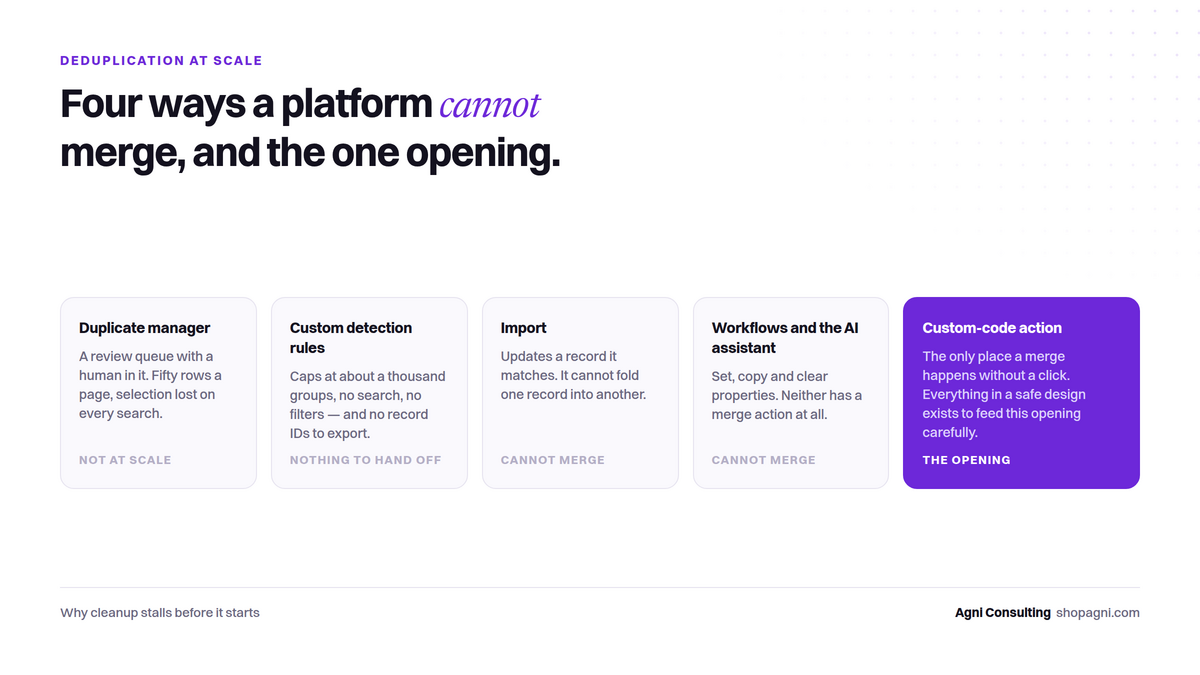
It is a review queue with a human in it
The native duplicate manager surfaces suggested pairs for someone to look at. Its bulk merge works only on a manual selection: fifty rows a page, the selection lost on every search, the criterion reset every time you come back. At a few hundred pairs that is a bad afternoon. At a few thousand it is not a plan.
Custom detection rules cap out and hide the IDs
You can define your own duplicate criteria, which sounds like the answer. In practice the rules cap at about a thousand groups, offer no search and no filters, and — the part that matters most — do not expose record IDs. You cannot take what the tool found and feed it to anything else.
Import can’t merge. Workflows can’t merge. The assistant can’t merge.
An import can update a record it matches; it cannot fold one record into another. A workflow can set, copy and clear properties; it has no merge action. The vendor’s AI assistant, asked directly, had no merge capability at all — not a permissions gap, a missing tool.
The one opening
A workflow custom-code action can call the merge endpoint. It is the only place in the platform where a merge happens without a click. Everything else in a safe design exists to feed that opening carefully: decide offline against a full export (the step the UI cannot do), write the survivor’s ID onto the record that will disappear via a single-purpose property, enrol on that property, re-fetch both records at run time, run twelve guards, and route every refusal to a review list with the reason written out.
That is a build, not a setting. It comes with gates — three rows that cannot merge, then one, then ten, then a stratified 250 — and with five platform behaviours you will only learn from evidence.
The larger point is upstream
The portal in question was generating duplicates faster than any cleanup could remove them. Cleaning without closing that hole is bailing a boat. The executor’s real value was the credibility to insist on an import standard — a required domain column, no auto-creation of companies — before the next purchased list landed.
If you have inherited a portal like this, the first step is not the duplicate manager and not a rebuild. It is a read-only audit that tells you where the surplus came from and what a fix requires: the GTM Systems Audit.