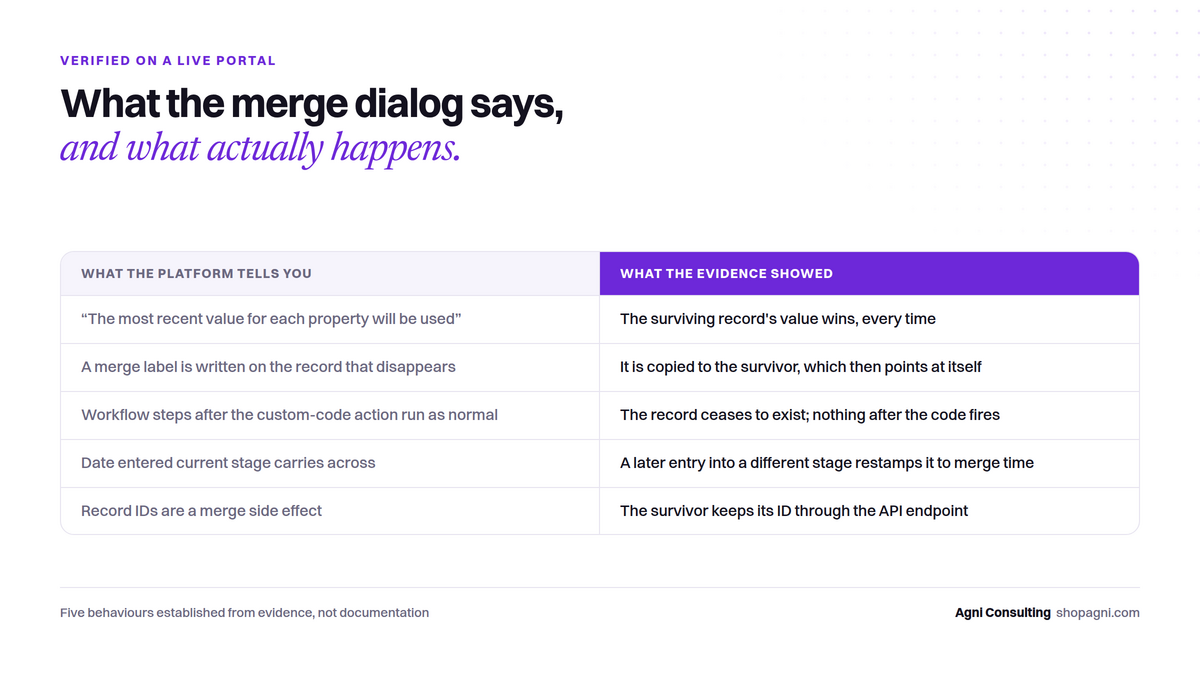
These five behaviours came out of building a guarded merge executor for a six-figure company object. Each was established from evidence on a live portal, not from the manual, and each changes how you should design a merge at any scale above a handful. Where the platform’s own text disagrees with what happened, both are given.
1. Property precedence: the surviving record’s values win
The merge dialog says “in most cases the most recent value for each property will be used.” That is not what happens. Across five records with a deliberately chosen discriminator field — a value set differently on survivor and loser, with the loser’s value the more recent — the survivor’s value was retained every time.
The knowledge base is right; the dialog is misleading. Design consequence: choose the survivor for the values you want to keep, not the record you think is “newer”. If a loser holds a value you need, copy it across in code before the merge.
2. The survivor inherits the label
If you drive merges from a property — a merge into record ID written onto the record that will disappear — the merge copies that property onto the survivor, leaving the survivor pointing at itself.
Harmless once. At scale it floods your review list with survivors that look like un-merged candidates. The fix cannot be a later workflow step (see 3); it has to happen inside the code, before the merge call returns. Clear the label on the survivor as part of the same execution.
3. No downstream workflow action runs for a merged record
The enrolled record ceases to exist the instant the merge lands. The workflow run stops there. Any action you placed after the custom-code step — write a log, set a flag, send a notification — never fires for a successful merge.
Design consequence: anything that must happen on success happens inside the code, before the callback. The steps after the code action are only ever reached by records that did not merge, which makes them the right place to route refusals to a static review list.
4. Date entered current stage follows its own rule
The merged record takes the latest entry into the current lifecycle stage across the merged history. But if that history contains a later entry into a different stage, the field is restamped to the merge time.
On the portal in question this affected 29% of the candidate pool, with existing stamps a median of eight months old. Left undiscovered, it would have quietly rewritten funnel timing for a third of the merges. It was quantified before anything ran, split into its own explicitly-accepted batch, and decided on the record. The first hypothesis for the mechanism was wrong; it was corrected against a record that refuted it. Expect to need the same humility.
Related and worth stating plainly: a merge adopts the furthest-down-funnel lifecycle stage, and that is not configurable. Make the higher-stage record the survivor, always, so its stage never changes and no fresh stamp is written.
5. Record IDs are preserved through the API merge endpoint
Once the relevant beta is enabled, the survivor keeps its record ID through an API merge. And a merged survivor inherits the secondary’s workflow enrolment history — so with re-enrolment off, the survivor will not be re-enrolled by the property that drove the merge. That is the behaviour you want, and it also means any record you hold for a deliberate retry needs a deliberate re-trigger.
What this means if you are merging at scale
Put the credential in a workflow secret and never let it leave the platform. Re-fetch both records at run time; never trust the CSV that produced the candidate pair. Enforce every safety rule in the guard set, not in which rows happen to be in the file. Turn on the action’s rate limit before the first batch above fifty, and after every batch compare code executions to enrolments — the platform will not raise a flag when it silently skips the code for records over its throughput. Let 429 and 5XX throw, or you defeat the platform’s own retry. And run three rows that cannot merge before you run one that can.
The full account, including the gates and what went wrong, is in the case study. If you have inherited a portal and want the same read-only look at what it has been doing, that is the GTM Systems Audit.